
Write a C program, which takes two integer operands and one operator from the user, performs the operation and then prints the result. (Consider the operators +,-,*, /, % and use Switch Statement).
Write a C program, which takes two integer operands and one operator from the user, performs the operation and then prints the result. (Consider the operators +,-,*, /, % and use Switch Statement).
Algorithm
start
	step1: Read num1,num2 and operator
	step2: switch (operator)
	step3: case '+': result = num1 + num2
	step4: 		Print result
	step5: case '-': result = num1 - num2
	step6: 		Print result
	step7: case '*': result = num1 * num2
	step8: 		Print result
	step9: case '/': if num2 ≠ 0 then
	step10:		result = num1 / num2;
	step11:		Print result
	step12:		else Print "Error: Division by zero is not allowed"
	step13: case '%': if num2 ≠ 0 then
	step14:		result = num1 % num2;
	step15:		Print result
	step16:		else Print "Error: Division by zero is not allowed"
	step17:default: Print "invalid operator"
	step18:end switch
stop
Flowchart
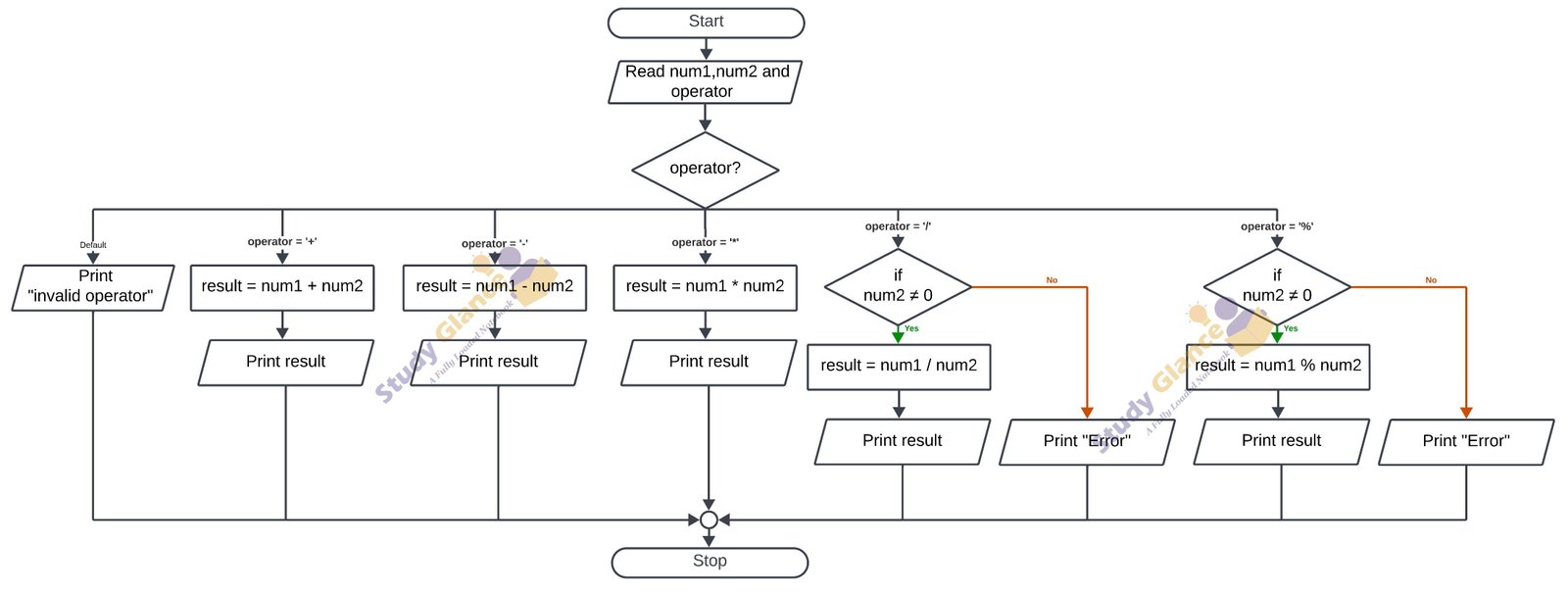
C Programming
//takes two integer operands and one operator from the user, performs the operation and then prints the result. (Consider the operators +,-,*, /, % and use Switch Statement).
#include <stdio.h>

int main() {
    int num1, num2, result;
    char operator;

    // Take input from the user
    printf("Enter two numbers: ");
    scanf("%d%d", &num1,&num2);
    printf("choose an operator (+,-,*,/,%): ");
    scanf(" %c", &operator);  // Note the space before %c to consume any whitespace

    // Perform the operation based on the operator
    switch (operator) {
        case '+':
            result = num1 + num2;
            printf("%d + %d = %d\n", num1, num2, result);
            break;
        case '-':
            result = num1 - num2;
            printf("%d - %d = %d\n", num1, num2, result);
            break;
        case '*':
            result = num1 * num2;
            printf("%d * %d = %d\n", num1, num2, result);
            break;
        case '/':
            if (num2 != 0) {
                result = num1 / num2;
                printf("%d / %d = %d\n", num1, num2, result);
            } else {
                printf("Error: Division by zero is not allowed.\n");
            }
            break;
        case '%':
            if (num2 != 0) {
                result = num1 % num2;
                printf("%d %% %d = %d\n", num1, num2, result);
            } else {
                printf("Error: Division by zero is not allowed for modulus.\n");
            }
            break;
        default:
            printf("Invalid operator\n");
            break;
    }

    return 0;
}
OUTPUT
Enter two numbers: 55 3
choose an operator (+,-,*,/,%): %
55 % 3 = 1
💻 Run This C Program
Write a C program, which takes two integer operands and one operator from the user, performs the operation and then prints the result. (Consider the operators +,-,*, /, % and use Switch Statement).
The selected C program is loaded automatically. Edit the code,
provide input through STDIN and click Run.
The compiler is embedded using OneCompiler. Your program runs in
the embedded C environment; Study Glance does not execute C code
directly on your web server.