
Logistic Regression
Solution :
Library Installation:
To install required library files, Open Command Prompt or Terminal and execute the following commands
$ pip install scikit-learn

$ pip install numpy

$ pip install matplotlib
PROGRAM: (Logistic_Regression.py)
# Import libraries
import numpy as np
import matplotlib.pyplot as plt
from sklearn.linear_model import LogisticRegression
from sklearn.model_selection import train_test_split
from sklearn.metrics import accuracy_score, confusion_matrix, classification_report
# Sample dataset
from sklearn.datasets import make_classification
X, Y = make_classification(n_samples=150, n_features=2, n_redundant=0,
                          n_informative=2, n_clusters_per_class=1, random_state=42)
# Split dataset
X_train, X_test, Y_train, Y_test = train_test_split(X, Y, test_size=0.2, random_state=42)
# Train model
model = LogisticRegression()
model.fit(X_train, Y_train)
# Predict
Y_pred = model.predict(X_test)
# Evaluation
accuracy = accuracy_score(Y_test, Y_pred)
print(f"Accuracy: {accuracy * 100:.2f}%")
print(f"Confusion Matrix:\n{confusion_matrix(Y_test, Y_pred)}")
print(f"Classification Report:\n{classification_report(Y_test, Y_pred)}")
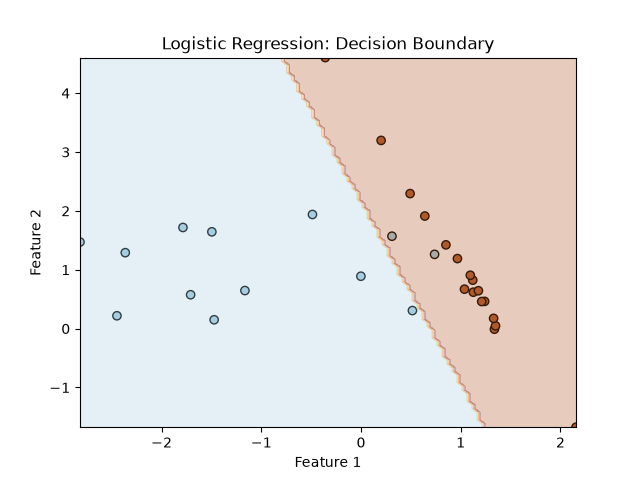
# Visualization
plt.scatter(X_test[:, 0], X_test[:, 1], c=Y_test, cmap=plt.cm.Paired,
            marker='o', edgecolors='k')
plt.title("Logistic Regression: Decision Boundary")
plt.xlabel("Feature 1")
plt.ylabel("Feature 2")
# Decision boundary
xx, yy = np.meshgrid(
    np.linspace(X_test[:, 0].min(), X_test[:, 0].max(), 100),
    np.linspace(X_test[:, 1].min(), X_test[:, 1].max(), 100)
)
Z = model.predict(np.c_[xx.ravel(), yy.ravel()])
Z = Z.reshape(xx.shape)
plt.contourf(xx, yy, Z, alpha=0.3, cmap=plt.cm.Paired)
plt.show()
OUTPUT:
Coefficients (slopes): [1.60343035 0.97089397]
Intercept: 0.7198544698544644
Mean Squared Error: 0.613818475239996
R-squared: 0.9924219941328396

C:\Users\madhu\Downloads\pa>python lr.py
Accuracy: 93.33%
Confusion Matrix:
[[11  2]
 [ 0 17]]
Classification Report:
              precision    recall  f1-score   support

           0       1.00      0.85      0.92        13
           1       0.89      1.00      0.94        17

    accuracy                           0.93        30
   macro avg       0.95      0.92      0.93        30
weighted avg       0.94      0.93      0.93        30
💻 Run This Python Program
Logistic Regression
The selected Python program is loaded
automatically into the editor.
Edit the program, provide input through
STDIN if required
and click Run.
The compiler is embedded using OneCompiler.
Your Python program runs inside the embedded
Python environment; Study Glance does not execute
Python code directly on your web server.
If the program asks for input, type the value in the
STDIN box before clicking Run.
These programs use libraries such as NumPy, Pandas,
Matplotlib, scikit-learn, SciPy and statsmodels, and
graph windows (
plt.show()) cannot be displayed
here. The data files shown in the lesson (CSV) are loaded
into the editor automatically. If a library is not
available in the embedded compiler, use
Copy Program and run the program on your
computer (after pip install of the libraries)
or in Google Colab.