Cookies
A cookie is a small piece of information stored by a web browser on the user's computer or device.
In simple words, cookies help websites remember users and their preferences.
Example: When a user logs into a website and selects the "Remember Me" option, the website may use a cookie to remember the user's session.
Working of Cookies
- First-Time Request: The browser sends a request to the server. The server responds with a cookie using the Set-Cookie header and the browser stores it.
- Subsequent Request: The browser automatically sends the stored cookie along with the next request using the Cookie header. The server receives the cookie and identifies the client or retrieves the associated session information.
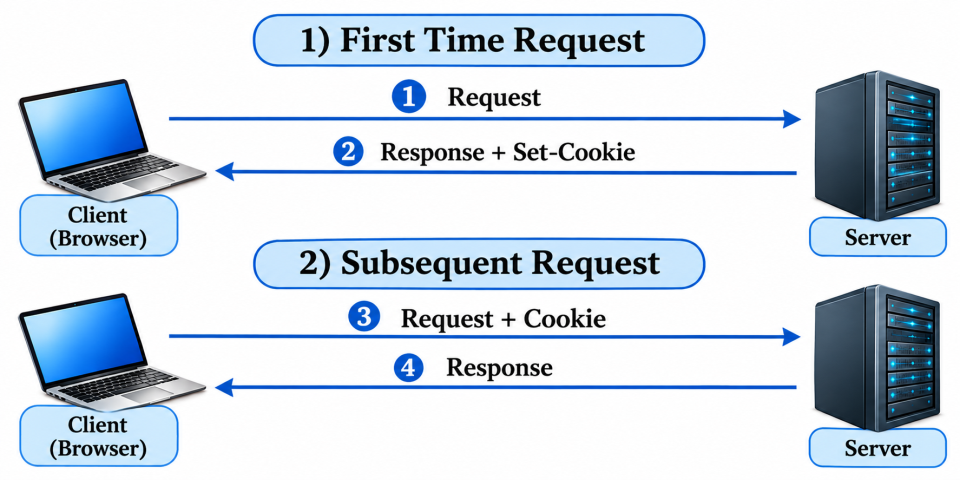
Fig: Working of Cookies
Cookies in Ruby CGI
Ruby provides cookie support through the CGI library. We can use cookies to store and retrieve information in Ruby CGI applications.
Three important operations are:
- Creating a cookie: Sending a cookie from the server to the browser.
- Reading a cookie: Retrieving the cookie sent by the browser.
- Deleting a cookie: A cookie is deleted by setting its expiration time to a past date.
1. Creating a Cookie
Ruby provides the built-in cgi library to create and manage cookies in CGI applications.
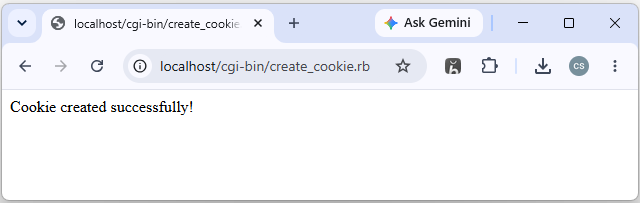
A cookie can be created using the CGI::Cookie class and sent to the browser along with the HTTP response.
Example: create_cookie.rb#!C:/Ruby40-x64/bin/ruby.exe
gem 'cgi', '0.5.2'
require 'cgi'
cgi = CGI.new
cookie = CGI::Cookie.new(
'name' => 'username',
'value' => 'Madhu',
'expires' => Time.now + 3600
)
cgi.out('cookie' => cookie) do
"Cookie created successfully!"
end
2. Reading a Cookie
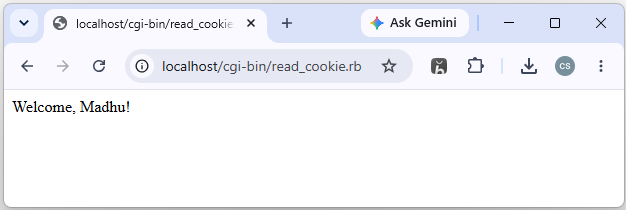
Ruby provides the cookies method in the CGI library to read cookies sent by the browser. The server can retrieve a cookie using its name and access the stored value.
Example: read_cookie.rb#!C:/Ruby40-x64/bin/ruby.exe
gem 'cgi', '0.5.2'
require 'cgi'
cgi = CGI.new
cookie = cgi.cookies['username']
if cookie
username = cookie.value.first
else
username = 'Guest'
end
cgi.out do
"Welcome, #{CGI.escapeHTML(username)}!"
end
3. Deleting a Cookie
A cookie can be deleted by setting its expiration time to a past date. When the browser receives the response, it removes the cookie from its storage.
Example:cookie = CGI::Cookie.new(
'name' => 'username',
'value' => '',
'expires' => Time.now - 3600
)Note: Create the above Ruby program files in the Apache CGI directory (C:\Apache24\cgi-bin\). Start the Apache web server by opening the Command Prompt, navigating to the Apache bin directory (C:\Apache24\bin>), and executing the httpd.exe command.